AR / Spatial Computing · iOS / SwiftUI
EyeCheck
Understand your vision in minutes: AR eye-chart and colour perception tests on iPhone, with simple explanations of conditions like myopia.
- Platforms
- iPhone
- Category
- AR / Spatial Computing, iOS / SwiftUI
- Built with
- Swift, Augmented reality
Overview
EyeCheck helps people understand their vision in a fun, interactive way. It places a real-size eye chart and virtual glasses in the room with augmented reality, runs a visual test and a colour perception test, and explains conditions such as myopia with interactive diagrams. It is built for everyone and is clearly framed as an educational tool, not a substitute for a professional eye exam.
Interface
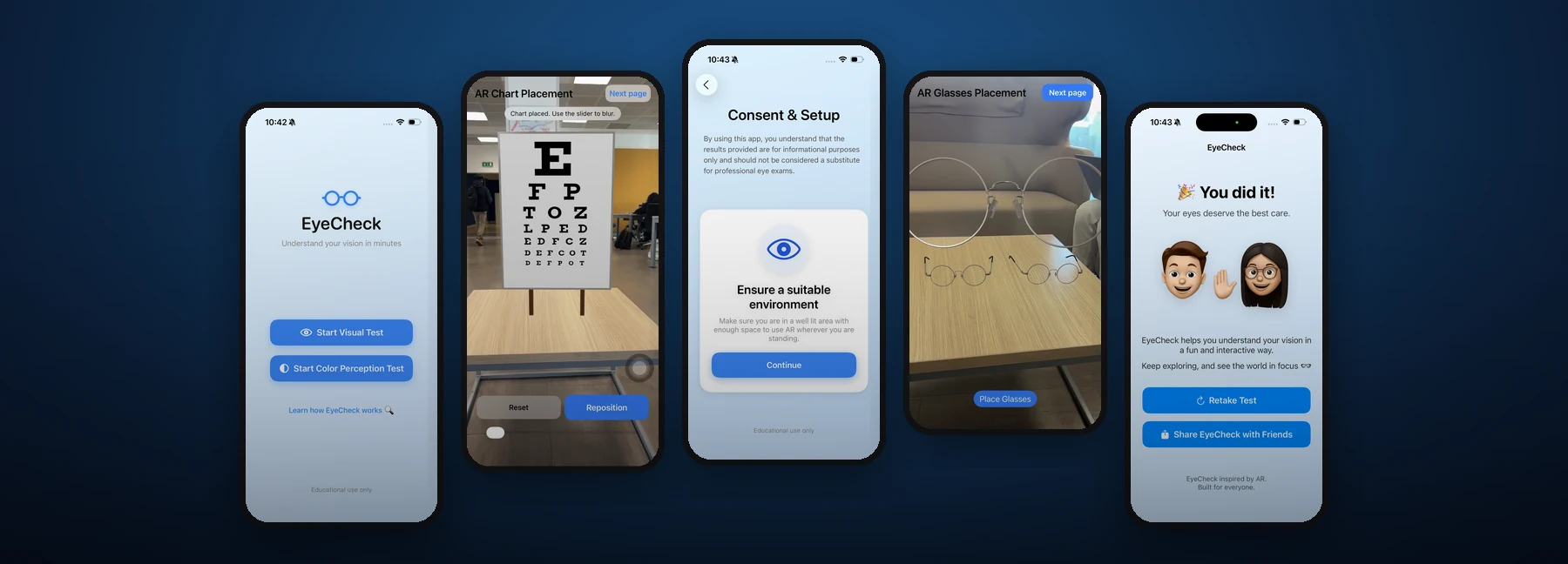
Tap any screen to view it full size.
Understand your vision in minutes
Consent & setup: educational use only
AR eye chart placement
AR glasses placement
Vision analysis: myopia explained
Results, retake and share
Case study
The problem
Many people only think about their eyesight at an eye exam, and terms like myopia are hard to picture. There was room for a friendly, interactive way to try a vision test at home and understand what it means, while making clear it does not replace a professional exam.
My role & contributions
Developer on the team. I coded the AR eye chart and glasses placement, the visual and colour perception tests, and the vision analysis screens.
Solutions & features
- Visual test with a Snellen eye chart placed in AR, and a slider to simulate blur.
- Colour perception test.
- AR glasses placement to see how a correction lens changes the view.
- Vision analysis screens that explain myopia, with a slider showing how a lens moves the focus point back to the retina.
- Consent and setup step: informational use only, plus guidance on lighting and space for AR.
- Results screen with Retake Test and Share EyeCheck with Friends.
Technology
- Swift
- Augmented reality